
IPTV service in Brampton, Ontario
IPTV Brampton: Plans, Setup and a Free 24-Hour Trial
IPTV delivers television over your internet connection, so there is no cable line to install. Choose a Standard or Premium IPTV Brampton plan for 1, 3, 6 or 12 months, pay by Interac e-Transfer and set it up on devices you already own. Not sure yet? Start with a free 24-hour trial and see how it runs on your own connection.
- Free 24-hour trial
- Pay by Interac e-Transfer
- Prices in Canadian dollars
- No automatic renewal
The basics
What IPTV Is and How It Works in Brampton
A plain-language explanation for anyone switching from cable or trying IPTV for the first time.
What IPTV is
IPTV stands for Internet Protocol Television. Instead of arriving over a cable line or a satellite dish, programming is delivered over the internet to a player app. That is why the same service can be used on a TV, a phone or a computer: wherever you have a connection and a compatible app.
How our service works
You choose a plan and place an order, pay by Interac e-Transfer, and we send your login by e-mail or WhatsApp once we have received the payment. You then enter the login in a player app on your device. Every device has its own setup guide.
What you need to start
A compatible device such as a Firestick, Smart TV, Android device, Apple TV, Roku, Formuler box, phone or computer; a player app; and a home internet connection. How smoothly it plays depends partly on your connection, Wi-Fi and device, which is why there is a free trial.
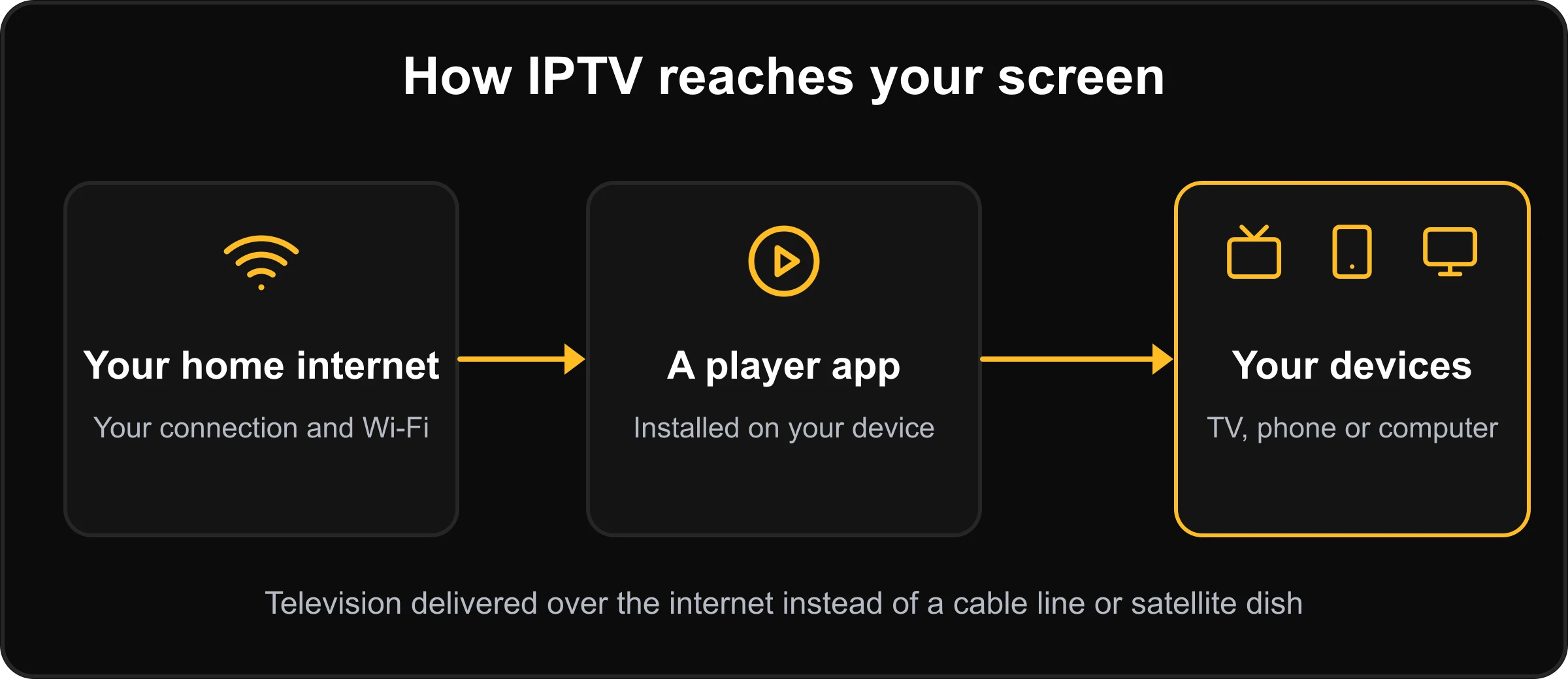
Your connection and Wi-Fi
Installed on your device
TV, phone or computer
Television delivered over the internet instead of a cable line or satellite dish.
New to IPTV? Read what IPTV is and how it works, follow the complete setup guide, or see why streams buffer and how to fix it.
The lineup
Check the Lineup Before You Decide
Everyone watches something different, so look at the channels you care about first. There are three ways to do that.
Browse the channel list
See the channel categories on the IPTV Brampton channel list page. Open the channel list →
Test it free for 24 hours
Use the free trial to look for the channels you watch, on your own device, at the times you normally watch. Request the free trial →
Ask us on WhatsApp
Tell us what you want to watch and ask before you order. We reply as soon as we can. Message us on WhatsApp →
Switching from cable
IPTV vs Cable: What to Compare
Keep your own cable bill beside you. The middle column describes how our plans work; the right column lists what to check on any cable or satellite plan.
IPTV Brampton 4K
Check on your cable or satellite plan
IPTV Brampton 4K
Prepaid terms of 1, 3, 6 or 12 months. Subscriptions do not renew automatically.
Check on your cable or satellite plan
The length of any contract, early-cancellation fees, and what happens when a promotional price ends.
IPTV Brampton 4K
Uses devices you already own, such as a Firestick, Smart TV, phone or computer, with a player app.
Check on your cable or satellite plan
Set-top box or receiver rental fees, and whether a technician visit is needed.
IPTV Brampton 4K
Interac e-Transfer in Canadian dollars. No card payments on the site.
Check on your cable or satellite plan
Billing method, billing date and any extra fees on the statement.
IPTV Brampton 4K
One device is included. You can add up to 5 at checkout, and the extra cost is shown before you pay.
Check on your cable or satellite plan
How many TVs the plan covers and what each extra box costs.
IPTV Brampton 4K
A free 24-hour trial. No payment is collected.
Check on your cable or satellite plan
Whether you can test the service before you sign up.
IPTV Brampton 4K
Install a player app and enter your login. There is one guide per device.
Check on your cable or satellite plan
Installation appointments, wait times and wiring.
IPTV Brampton 4K
Refund requests are covered within 7 days of activation, with the exclusions set out in the policy.
Check on your cable or satellite plan
Cancellation and refund terms in writing.
IPTV Brampton 4K
WhatsApp and e-mail. We reply as soon as we can.
Check on your cable or satellite plan
Support channels and hours listed on your provider’s site.
Want the longer version? Read the cost of cable vs IPTV in Brampton.
Plans and prices
IPTV Brampton Plans: Standard and Premium
Prices are in Canadian dollars and are read live from our store, so they always match the checkout. Premium costs more than Standard at every length. Not sure which suits your devices? Ask us on WhatsApp before you order.
Standard
Choose 1, 3, 6 or 12 months. Prices in CAD.
Premium
Choose 1, 3, 6 or 12 months. Prices in CAD.
Included with every plan
- One device included. Add up to 5 at checkout; the extra cost is shown before you pay.
- Choose M3U or Xtream login in the order form.
- Choose the full channel package or Canada and USA only at checkout.
- Pay by Interac e-Transfer in Canadian dollars. Card payments are not taken on this site.
- No automatic renewal. You decide whether to buy another term.
- Refund requests are covered within 7 days of activation. The refund policy sets out what is covered.
- Order a new subscription, a renewal or an extra device by choosing that option in the order form.
- Plans work on the devices that have a setup guide: Firestick, Android, Android phone, Apple TV, Windows and Mac, Smart TV, Roku and Formuler. MAG boxes are not supported.
Choosing a term
How to Choose Between 1, 3, 6 and 12 Months
Start with 1 month
The most flexible option. A good fit if you have already tested the service and want to run it for a month on your own setup before committing to more.
3 or 6 months
A middle path once you know the service suits your home. Both cost less per month than the 1-month plan and still end on their own, with no automatic renewal.
12 months
The lowest cost per month in each tier. You pay once for the year, so it suits households that are sure of their setup. Remember that nothing renews automatically, so note the end date.
Getting started
Start Watching in Three Steps
Choose your plan and options
Pick Standard or Premium and a term. In the order form choose your device, login format (M3U or Xtream), channel package and number of devices, and whether this is a new subscription, a renewal or an extra device.
Pay by Interac e-Transfer
After you place the order, the confirmation shows where to send the transfer, the amount and your order number. Enter the order number as the transfer message so we can match your payment. New to it? Interac explains how e-Transfer works.
Receive your login and set up
Once we have received your payment we send your login by e-mail or WhatsApp. Open the setup guide for your device, install a player app and enter your login.
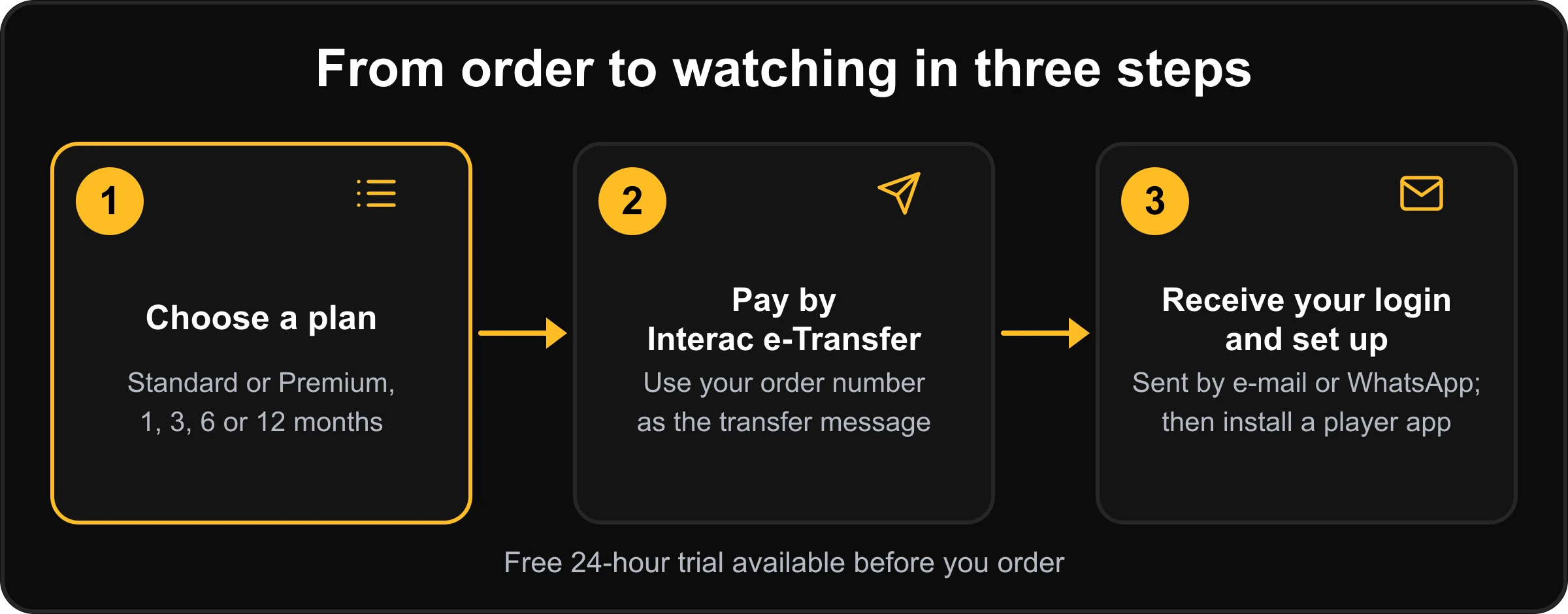
Standard or Premium, 1, 3, 6 or 12 months
Use your order number as the transfer message
Sent by e-mail or WhatsApp; then install a player app
Free 24-hour trial available before you order.
Not ready to pay?
Try IPTV Free for 24 Hours
Test the service on your own device and your own internet connection before you choose a plan. The page explains what the trial includes, how to prepare and how to judge the result.
- 24 hours of testing
- $0: no payment is collected
- Choose a Standard or Premium trial package
- Choose M3U or Xtream login
- Login sent by e-mail or WhatsApp
Devices
Set It Up on Your Own Devices
Each guide walks through one device. MAG boxes are not supported.
Firestick
Our guide covers installing a player app on a Fire TV Stick and entering your login. Setup guide →
Android TV and boxes
Covers Android devices, choosing a compatible player and the login format to use. Setup guide →
Android phone
Covers choosing a player and using Wi-Fi or mobile data on a phone or tablet. Setup guide →
Apple TV
Explains what to check, such as tvOS compatibility and App Store availability, before you pick a player. Setup guide →
Windows and Mac
Covers watching on a computer with a player such as VLC or Kodi. Setup guide →
Smart TV
Covers Samsung (Tizen) and LG (webOS) TVs, and Android TV or Google TV. Setup guide →
Roku
Roku works differently from Android-based devices. The guide covers screen mirroring and AirPlay on a compatible Roku. Setup guide →
Formuler and Dreamlink
Covers Formuler and Dreamlink boxes step by step. Setup guide →
Xtream login
A login made of a server address, a username and a password. Many player apps ask for it as “Xtream Codes”.
M3U login
A playlist link that a player loads. Some apps and devices work better with one format, and the guide for your device says which to enter.
For Brampton households
IPTV Made for Brampton Households
Plans are priced in Canadian dollars and paid by Interac e-Transfer, so there is no currency conversion and no card to enter. The service is delivered over the internet, so you use it on your own home connection and your own devices, and support reaches you by WhatsApp or e-mail.
Thinking of moving away from cable? Our article on the cost of cable vs IPTV in Brampton compares the two, and the about page explains who we are.
Switching from cable: a practical checklist
- Check when your cable contract or promotional price ends.
- Ask whether early-cancellation or equipment-return fees apply.
- Count the screens at home and decide which ones need the service.
- Run a speed test and check the Wi-Fi in each room where you watch (see the buffering guide).
- Write down the channels your household actually watches.
- Start with the free trial before you cancel anything.
Resellers
Interested in Reseller Credits?
Reseller credit packs come in four sizes, 120, 240, 360 and 480 credits, in Standard and Premium. The reseller page explains the options and how to order.
Standard reseller pack, 120 credits
The smallest pack. Larger and Premium packs are on the reseller page.
$300.00Add to cart
Ask before you buy
Questions About a Plan, a Device or Your Order?
Message us and we reply as soon as we can. There is no contact form; WhatsApp and e-mail are the two ways to reach us.
+1 (343) 512-7469. Ask about plans, setup or your order. Chat on WhatsApp →
contact@iptvbrampton4k.ca. Good for detailed questions about your order. Send an e-mail →
Read the FAQ
Answers about payment, devices, the trial, renewals and refunds. Open the FAQ →
Questions
IPTV Brampton Questions and Answers
What is IPTV and how is it different from cable?
IPTV delivers television over the internet to a player app on your own device, while cable arrives over a dedicated line and usually needs a set-top box. With IPTV the equipment is a device you already own, and how well it plays depends on your internet connection.
Read the full explanation in our guide to what IPTV is.
How do I pay?
By Interac e-Transfer. After you place your order you see the transfer details, including the amount and your order number, which you enter as the transfer message. We do not take card payments on this site.
Is there a free trial, and what does it include?
Yes. The trial lasts 24 hours and no payment is collected. You choose a Standard or Premium trial package, a login format and your device, and we send the login by e-mail or WhatsApp.
Read how the free trial works.
Which devices can I use?
We have setup guides for Firestick, Android, Android phone, Apple TV, Windows and Mac, Smart TV, Roku and Formuler. MAG boxes are not supported. Start from the setup hub.
Can I watch on more than one device?
One device is included with each subscription. You can add more, up to 5 in total, at checkout, and the checkout shows the extra cost before you pay.
What are M3U and Xtream, and which should I choose?
They are two ways a player app can load your subscription: an Xtream login (server address, username, password) or an M3U playlist link. The order form asks which you prefer. If you are not sure, read the guide for your device before you order or ask us.
What does the channel package choice at checkout mean?
At checkout you can choose the full channel package or Canada and USA only. Choose the one you want in the order form. If you are unsure, ask us before you order.
What internet connection do I need?
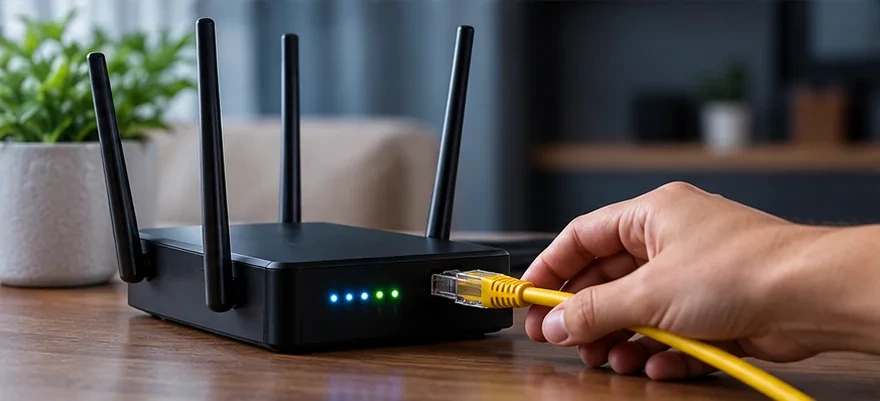
There is no single number: it depends on how many screens you use at once and the picture quality you watch. A wired connection is usually steadier than Wi-Fi. Run a speed test on the device you will use, test during your normal viewing hours, and use the free trial to see how it runs at home.
Why might a stream buffer, and what can I do?
Common causes are a weak Wi-Fi signal, too many devices using the network, an overloaded router, an out-of-date app and a slow connection at busy times. Restart the app and the router, move closer to the router or use a cable, and close other streams. The buffering guide walks through the steps.
Do subscriptions renew automatically?
No. You choose whether to buy a new term when your current one ends.
What is your refund policy?
Requests made within 7 days of activation are covered. Refunds go back by Interac e-Transfer to the sender’s account, typically within 2 to 3 business days. Requests after 7 days and problems caused by your own internet connection or device are not covered, and a free trial has nothing to refund. Read the refund policy for the full wording.
Are adult channels included?
No. Our service does not include any adult (18+) channels.
I am new to IPTV. How do I get started?
Try the free trial first, then read the setup guide for your device. When you are ready, choose a plan, pay by Interac e-Transfer and we send your login by e-mail or WhatsApp. If you get stuck, message us on WhatsApp or e-mail contact@iptvbrampton4k.ca.
Do you have a reseller program?
Reseller credit packs are available in Standard and Premium. See the reseller page for the options.
More answers on the full FAQ page, and our terms of service explain renewals and availability.
From the blog
Guides and Articles

How to Find the Best Live Sports Channels in Your IPTV Package
IPTV Channels & Entertainment Best Sports Channels IPTV: How to Find Live Sports in Your Package Looking for…

IPTV Buffering & Freezing: Complete Troubleshooting Guide
IPTV Setup & Troubleshooting IPTV Buffering Fix: How to Stop Freezing & Lag Looking for an IPTV buffering…

The Real Cost of Cable vs IPTV in Brampton and the GTA (2026)
IPTV Brampton & GTA The Real Cost of Cable vs IPTV in Brampton and the GTA Cost of…
Ready to Try IPTV Brampton 4K?
Start with the free 24-hour trial, or compare the plans and pay by Interac e-Transfer. Questions first? Message us on WhatsApp.