
Device setup guide
How to Setup IPTV on PC: Windows and Mac
This guide shows how to setup IPTV on PC with two free players, VLC for a quick playlist-link setup and Kodi for a TV-style channel list, on Windows and on a Mac. It also covers a Mac App Store option and says what we do not recommend yet.
Editorial review: 30 October 2026, against VideoLAN’s documentation, the Kodi PVR IPTV Simple Client project page and the Mac App Store listing. We have not tested these steps on every Windows or macOS version.
Before you start
What You Need Before You Setup IPTV on a Computer
Have these ready on the computer.
Your connection details
Your connection details will be provided after your order has been processed. Keep them where you can copy them exactly.
An M3U login
VLC and Kodi take a playlist link. Choose M3U at checkout (one playlist link) rather than Xtream Codes if you plan to use them.
A stable connection
A wired connection is usually steadier than Wi-Fi for streaming.
Step 1
How to Setup IPTV on PC: Choose a Player for Windows or Mac
Before you learn how to setup IPTV on PC, pick one player. VLC and Kodi are free according to their own pages; the Mac option is a store app with its own terms.
VLC
- Quickest: open your playlist link and play
- Windows and macOS builds on the official VideoLAN site
- Free and open source, according to VideoLAN
- Takes an M3U playlist link
Kodi
- TV-style channel list through the PVR IPTV Simple Client add-on
- Reads an M3U playlist; guide data is a separate XMLTV file
- Takes longer to set up than VLC
- Free to use
HOT Player (Mac only)
- Mac App Store, developer STE DIGI VIBES SARL
- Requires macOS 12.0 or later
- M3U and M3U8 playlists, per the Mac listing
- Free with in-app purchases, including a one-year subscription from the developer
Step 2, VLC
How to Setup IPTV on PC With VLC
VLC is a media player that opens a network address you give it.
Download VLC
Get VLC from the official VideoLAN website. It offers separate downloads for Windows and for macOS (Universal and Apple Silicon).
Open a network stream
On Windows, VideoLAN’s documentation says to open the Media menu and choose Open Network Stream. On a Mac, VideoLAN’s wiki lists Open Network in the File menu. Menu names can differ between VLC versions.
Enter your M3U link
The Open Media window shows the Network tab. Paste your full M3U link into the text box. Check that nothing was added before or after it.
Play
Click Play and give VLC time to connect. If the playlist loads, its entries appear in VLC’s playlist, where you can pick a channel.
If it does not play
Copy the link again, check it is complete, and confirm the computer is online. VLC reports an error if the address cannot be opened.
Step 2, Kodi
How to Setup IPTV on PC With Kodi
This is how to setup IPTV on PC with a TV-style channel list. Kodi uses the PVR IPTV Simple Client add-on, whose project page describes the settings below.
Install Kodi
Download Kodi from the official Kodi website and install it on your Windows PC or Mac.
Add the PVR IPTV Simple Client
In Kodi, find the PVR IPTV Simple Client add-on and install it. Kodi’s add-on pages list it for current Kodi versions; menu names differ between Kodi versions.
Open the add-on settings
Under General, set Location to a remote path, then enter your M3U link in the M3U play list URL field. You can choose whether Kodi keeps a local copy of the playlist.
Guide data (optional)
The add-on reads the programme guide from a separate XMLTV file. Add a guide address only if you have one; this guide does not provide one.
Save and wait
Save the settings and give Kodi time to load the channel list for the first time.
Step 2, Mac option
HOT Player From the Mac App Store
An alternative to VLC and Kodi on a Mac.
Find the app
Open the App Store on your Mac and search for Hot Player. Check that the developer on the listing is STE DIGI VIBES SARL, and that your macOS version meets the requirement shown.
Get the app
Select Get and open the app when it finishes.
Add your playlist
Add your M3U link in the app’s playlist screen. The Mac listing mentions M3U and M3U8 playlists.
Read the terms
The app is free to download with in-app purchases, including a one-year subscription from the developer. That is separate from your streaming subscription.
Your login
M3U or Xtream Codes: How to Setup IPTV on PC With Your Login
The login type you choose at checkout decides which players you can use.
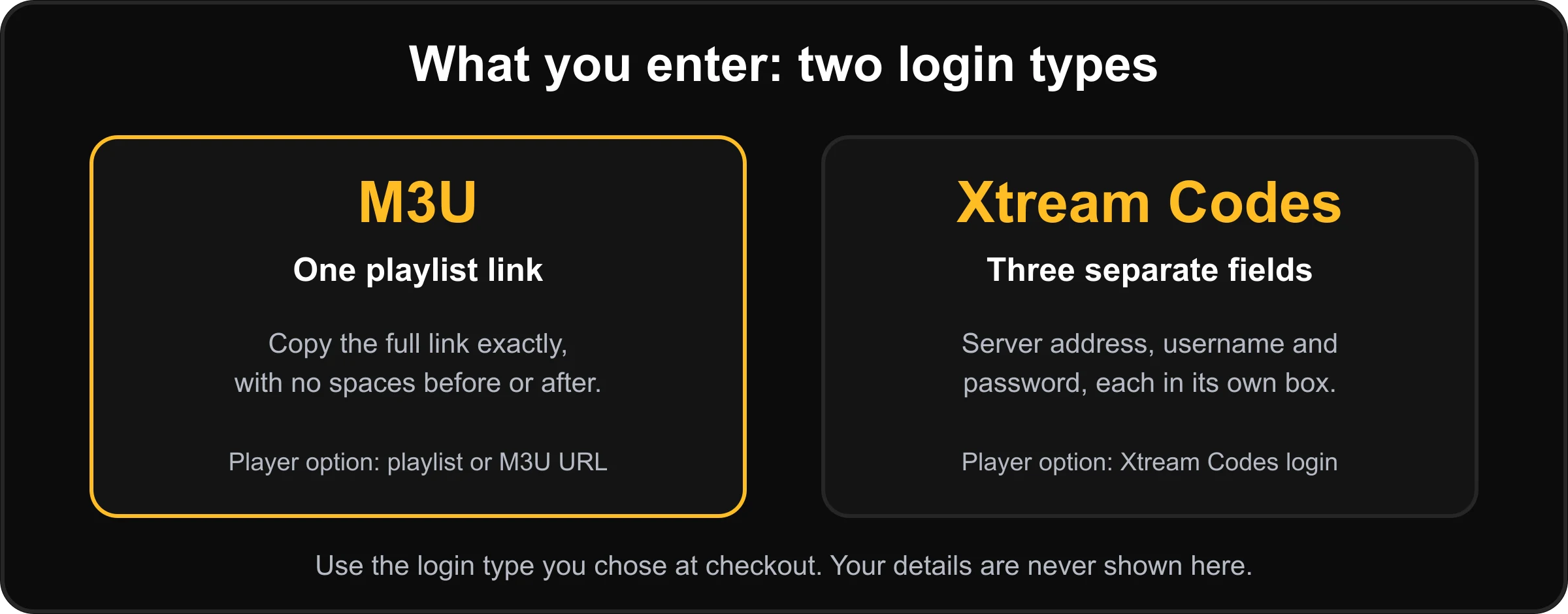
- Choose M3U at checkout if you plan to use VLC or Kodi.
- Paste the full playlist link, with no spaces before or after.
- Do not share the link publicly: it identifies your subscription.
- Check the player’s own page for the login types it accepts.
Connections and devices are different
The checkout lets you select 1 to 5 simultaneous connections; one is included and the cost of extra ones is shown before you pay. A connection is a screen streaming at the same moment. How many devices have a player installed is a separate matter, decided by the app, not by this website. If you plan to use one login on several devices, tell us before you order.
If something goes wrong
Windows and Mac IPTV Troubleshooting
If you are stuck on how to setup IPTV on PC, check these in order before you reinstall anything.
VLC will not open the link
Copy the link again, make sure it is complete, and check the computer is online.
No channels in Kodi
Check the Location is a remote path, the M3U play list URL is correct, then save and wait for the first load.
The Kodi add-on is missing
Menu names differ between Kodi versions. Search the add-ons for PVR IPTV Simple Client.
The login type does not fit
VLC and Kodi need an M3U link. If you chose Xtream Codes, message us before you order again.
Playback stutters
See the buffering and freezing guide.
Still stuck
Message us with your order number, your Windows or macOS version and the player you used. Contact us.
Questions
Windows and Mac IPTV Questions and Answers
Which login type should I choose for a computer?
Choose M3U. VLC opens a playlist link, and Kodi’s PVR IPTV Simple Client reads an M3U playlist, so an M3U link is what both need. Xtream Codes is a server address, a username and a password, which these two players do not take as a login. You choose the type when you order.
How to setup IPTV on PC: is VLC enough, or should I use Kodi?
VLC is the simpler route: open the link and play. Kodi takes longer to set up but gives a TV-style channel list and can use a separate guide file. Pick one; you do not need both.
Can I use TiviMate on a computer?
No. TiviMate is an Android application, meant for Android TV, Google TV and other Android-based devices. See our Android TV guide.
Is there a preferred app for Windows?
Not yet. A Hot Player listing exists in the Microsoft Store, but we could not verify its developer or details, so we do not recommend it on Windows. VLC and Kodi are the routes this guide supports.
Can I use Hot Player on a Mac?
Its Mac App Store listing names STE DIGI VIBES SARL as developer, requires macOS 12.0 or later, and mentions M3U and M3U8 playlists. It is free with in-app purchases, including a one-year subscription, and it says it is a media player only. Confirm the details on the listing for your Mac before you rely on it.
Do the player apps cost extra?
VLC and Kodi are free, according to their own pages. Other apps may ask for a licence, activation or subscription from their developer. That is separate from your streaming subscription and is not provided by us. Check each app’s listing for current terms.
How many screens can I watch on at once?
The checkout lets you select 1 to 5 simultaneous connections; one is included and the extra cost is shown before you pay. A connection is a screen streaming at the same moment, which is separate from how many devices have a player installed.
Are MAG boxes supported?
No. MAG boxes are not supported.
Sources
Official Sources Used for This Guide
Checked on 30 October 2026. These are the projects’ and stores’ own pages; menus, versions and terms can change.
Keep going
More Setup Help
All device setup guides
Pick another device from the installation hub.
Smart TV
Samsung, LG and other smart TVs.
Firestick and Fire TV
For Fire TV devices that run Fire OS.
Android TV and boxes
For Android TV, Google TV and Android boxes.
Buffering and freezing
Fix playback problems once you are set up.
Questions and answers
Ordering, payment and devices.